1. Search and select customer name
2. On family account, click Send email button
3. Select either Create an email or Select an existing template, click OK
4. Enter Subject, Description and select Recipient list
6. Click Save and continue
7. Drag and drop Document links from Add Items panel at right side to email content
8. Check Include link to financial statement box
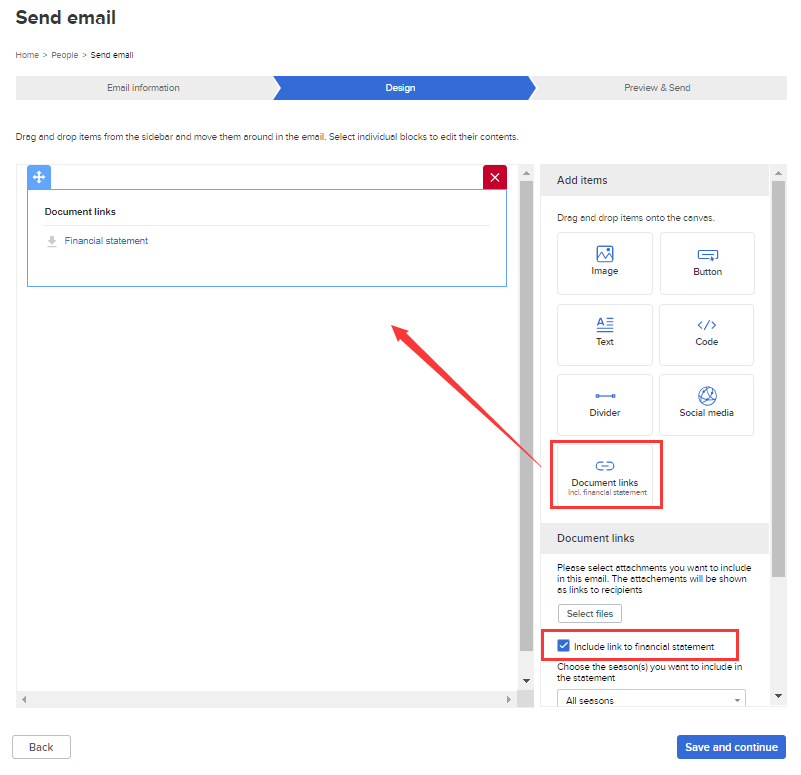
9. Drag and drop other desired items and adjust widget display orders by dragging up and down
10. Click Save and continue
11. (Optional) Click Send test email button at top right corner
12. Click Send
2. On family account, click Send email button
3. Select either Create an email or Select an existing template, click OK
4. Enter Subject, Description and select Recipient list
6. Click Save and continue
7. Drag and drop Document links from Add Items panel at right side to email content
8. Check Include link to financial statement box
9. Drag and drop other desired items and adjust widget display orders by dragging up and down
10. Click Save and continue
11. (Optional) Click Send test email button at top right corner
12. Click Send