Setup for Divisions by Time Standards meets
- Go to Set-up > Meet Set-up
- Under Meet Type - Divisions - select Time Standards
- Click OK
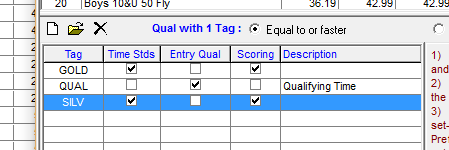
- Go to Events > Standards
- After setting up standards for meet check Scoring box for standards to be used for place and scoring
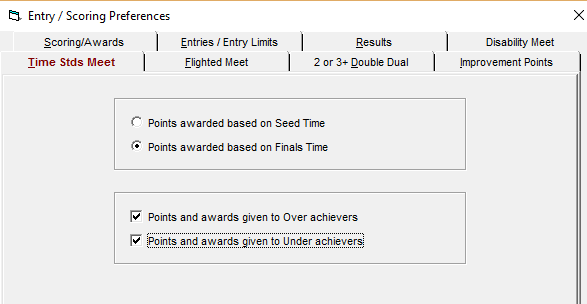
- Go to Set-up, Entry/Scoring Preferences > Time Stds Meet
- Select either Points awarded based on Seed Time or Points awarded based on Finals Time
- You also can select Points and awards given to Over achievers and Points and awards given to Under achievers
- You can select neither option, one of them or both
- Note: Over achievers are swimmers whose entry time falls in one standard, but finals time meets a faster standard. Under achievers are swimmers who entry time falls in one standard, but finals time meets a slower standard