To automatically charge meet or miscellaneous fees from swimmers, below are steps on how to require registrants to save a credit card or eCheck information during online registration after logging on Swim Manager
1. From Swim Manager homepage, go to Account on upper right-hand corner
Note: For registrations with a zero checkout payment (for example, a free-of-charge order), registrants will not be required to save a credit card or eCheck
This setting is not applicable for Front Desk Registrations
1. From Swim Manager homepage, go to Account on upper right-hand corner
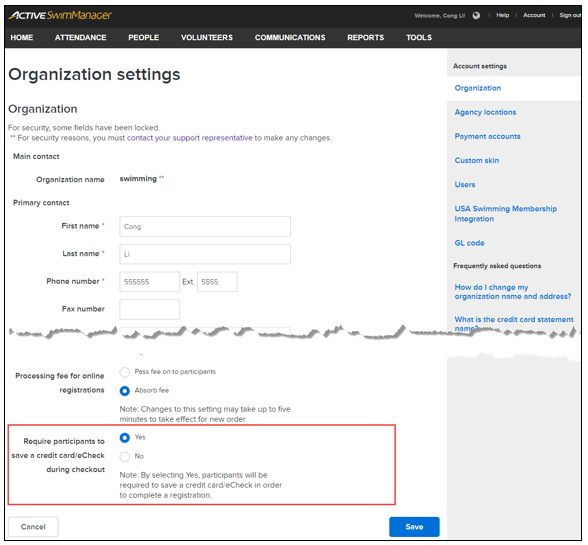
2. Scroll down Organizational Setting page
3. See Require participants to save a credit card/eCheck during checkout checkbox (defaults to checked)
3. See Require participants to save a credit card/eCheck during checkout checkbox (defaults to checked)
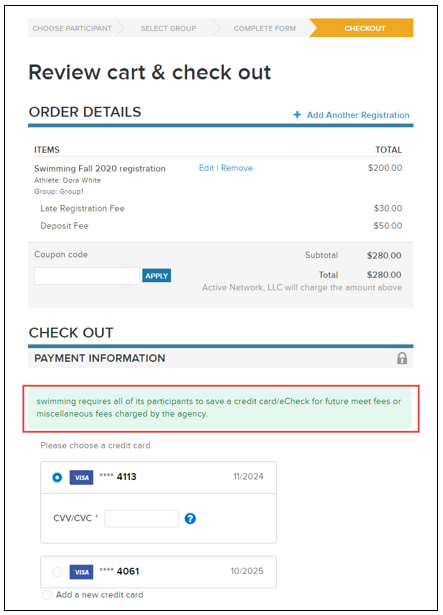
3. Once enabled, registrants must save a credit card or eCheck in order to complete the registration during checkout
Note: For registrations with a zero checkout payment (for example, a free-of-charge order), registrants will not be required to save a credit card or eCheck
This setting is not applicable for Front Desk Registrations