- Click People tab
- Search for and select customer
- Click Order to modify
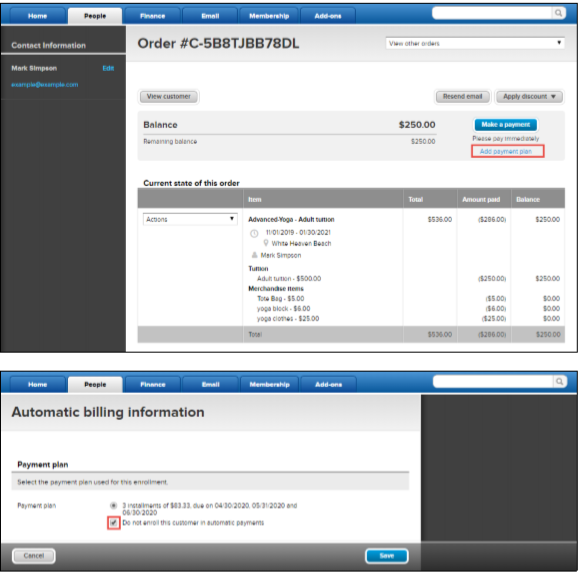
- Beneath Make a Payment, click Add Payment plan
- (Optional) Check Do not enroll this customer in automatic payments
- Note: Select this option if you do not have the registrant’s payment information or if they prefer not to use automatic billing. Registrants can manually pay their balance through their online account
- Follow the prompts
- Click Save
Add Payment Plan to an Existing Order
Document Details
| Article Number | 000028663 | |
| Article Type | Article} | |
| Article Link | https://support.activenetwork.com/camps/articles/en_US/Article/Add-Payment-Plan-to-an-Existing-Order |
Content Details
This article explains how to add a payment plan to an existing registration order.
 For additional information about removing a payment plan, use the article: Remove Payment Plan from an Existing Order